Tuesday, October 5, 2010

Programmer Team, Current Project

Posted by Aries Wandari

Programmer team current project.

Project
Description
Status
MSSRMaterial Selling System (non finish goods, waste, etc).Application done, waiting integration with SAP.
TLIMSWeb application replacing old LIMS.User trial.
Export TradingMaintain export trading data related to sales order, such as arrange
shipment, forwarder, forwarder commission, etc.
User trial.
Import non Trading (Procurement)Maintain import trading data (procurement import purchase order).Define user requirements.
Account Payable (AP) WorkflowTrack invoice status that accounting received from vendor.Workflow and application design done, go to coding.
SAP Server RelocationSAP server relocation currently abroad to local site.
SAP TradingSet new company code that will handle all corporate trading transaction. Since the company is registered as manufacture company, we have to set trading transaction separately from current system.Design organizational structure.

Wednesday, August 4, 2010

Fingerprint Project

Posted by Aries Wandari

Pemasangan fingerprint untuk di beberapa site di plant untuk menggantikan reader absensi dengan proximity card, Jumat dan Sabtu 30-31 Juni 2010 (2 hari).

Point safety:
1. Safety induction untuk si pekerja.
2. Pemakaian perlengkapan safety.

a. Glasses
b. Helmet
c. Jaket lengan panjang
d. Safety Shoes
e. Body harness (khusus untuk pemasangan di gate 2)
3. Pembuatan permit berdasarkan tipe pekerjaan.

Deskripsi pekerjaan:
1. Pemasangan fingerprint yang melekat di tembok. Mungkin perlu melakukan pekerjaan bor dinding. Mungkin juga ada pekerjaan pengelasan untuk pemasangan di store.
2. Pemasangan (penarikan) kabel jaringan dari lokasi fingerprint ke hub terdekat.
3. Khusus untuk pemasangan di gate 2, ada pekerjaan di ketinggian +- 4 m di atas permukaan tanah untuk pemasangan koneksi relay.

Lokasi pemasangan:
1. Gate 2
2. Kantin
3. Store
4. Control Building

Note:
- Melihat waktu pekerjaan yang singkat (hanya 2 hari), item safety bisa dipinjam melalui admin secretary (untuk visitor). Untuk pekerjaan lebih lama dapat meminta ke HSE.
- Pekerjaan mengebor dinding memerlukan secondary hot permit. Sedangkan pekerjaan pengelasan/gerinda memerlukan primary hot permit (mungkin ada pekerjaan ini untuk pemasangan fingerprint di store, mengingat konstruksi pintunya yang terbuat dari besi).
- Pekerjaan mengebor dinding perlu konfirmasi pula ke bagian yang mengurus layout bangunan (Maint. Dept.) bila ada kemungkinan di dalam dinding tersebut terdapat instalasi kabel dsb.
- Permit pekerjaan dikeluarkan per area.
- Area gate 2,kantin dan store, permit dikeluarkan oleh Admin Service Dept.
- Area control building, permit dikeluarkan oleh shift supervisor.

Sunday, May 17, 2009

Technical Evaluation for WEIGHBRIDGE – SAP SOLUTION Proposal

Posted by Aries Wandari

We’ve been accepting 6 proposal for our new weighbridge system so far. Two main qualification that the system can read our (old) weighing hardware correctly, and it has to be connected to SAP. This brand new weighbridge system will be:

  • Connected to SAP (customer, material, and transporter master data, pick Delivery Order directly).
  • To release truck, DO must pick directly from SAP. But its also can release truck in offline mode in case the SAP system is down. There is some flag that tell that the system is on offline mode. On offline mode, operator has authority to release truck. But there is validation routine once SAP connection establish.
  • Because SAP not allow user to access directly to SAP, the system must access via BAPI, and its follow as a normal transaction so that it follow normal transaction flow.
  • Approval mechanism in case the weight beyond tolerance, or validation routine after SAP system down. Tolerance configuration defined locally on the system, and it has to be easy to maintain.
  • Source code and manual, to tackle the need of system extension in the future.
  • User authorization: operator, administrator, manager (system approval).
  • Print ticket and update DO data in SAP telling that this DO has been carried out.
  • Weighing routine support for 2 types of material, finish good/non finish good.


My job is making technical evaluation of these vendor and propose rank of them. We can see their qualification based on proposal quality, system understanding on their presentation, and software demo. Source code, manual, and maintenance period is also one of big concern. And the price? We left it for procurement team and boss.


For those 6 proposal, 4 vendor do come and discuss what they have for our requirements.
  • Vendor A, the vendor which I get my SAP training. There is no doubt that this vendor is a SAP master. They also have good understanding on weighbridge business flow. But we have no data whether they can handle legacy weighbridge hardware (read the value of the weighbridge hardware). They do promise a demo on the second meeting.
  • Vendor B, sure an old player in weighbridge world, but not in SAP. Tight schedule of this weighbridge system make us force the vendor do a demo, showing that their software can connect to SAP and connect to weighbridge hardware. They do show us their program connect to weighbridge hardware. Its failed. One big loss for their rank, their system using third party component to connect to weighbridge hardware, and will be separate licence of the system. It does mean –eventhough we had the source code- we can’t extend the system since we don’t have the component.
  • Vendor C, good understanding in both weighbridge and SAP. Good software demo showing its integration with SAP. They miss first trial of demo connect to weighbridge hardware. But on later demo, they succeed reading value of the hardware. They give us VB.NET and VB6 demo, and both work.


  • Vendor D, thanks for their good effort. Old player of weighbridge system with lack of SAP experience. But they fail reading weighbridge hardware. They using many software to read com port traffic data, and even de-compiling our old weighbridge software to see how the software communicate with the hardware.


With that qualification, the sequence is (big point first) is: vendor C, vendor B, vendor A.


SAP Weighbridge Workflow

Weighbridge Software, Legacy

Posted by Aries Wandari


Weighbridge software is one of softwares IT responsible to maintain. Starting its duty on 96-an till now, with Windows 95 operating system using old PC with small harddisk space and without any network slot. We had try install it on Windows 2000, but the system become unstable. Meanwhile, the vendor stop supporting this legacy system. Its hard to maintain the software on those conditions. With current requirement that Weighbridge System must integrate with SAP, its time to replace the system.


Two weighing hardware connect to computer via com port 1 and 2, supporting 2 paralel weighing routine. Software can be configured whether it can only weighing in one direction (in or out only), or both.


Weighing routine flow chart


Tuesday, April 7, 2009

REAL SIMULATION: DISASTER RECOVERY > PART I

Posted by Aries Wandari

  • ACTIVITY ON DATABASE, INHOUSE APPLICATION AND INTRANET DISASTER RECOVERY
  • STEP ON SITE AND DESKTOP APPLICATION RECOVERY
  • INHOUSE APPLICATION INITIALIZATION TRIAL BY IT
  • INTRANET INITIALIZATION TRIAL BY IT
  • USER TEST ON INHOUSE APPLICATION AND INTRANET
  • PLACE FOR DATABASE AND DESKTOP APPLICATION BACKUP
  • BATCH FILE FOR BACKUP
  • APPENDIX A. Step to Restore Database
  • APPENDIX B. PHP and IIS Preparation
  • APPENDIX C. TROUBLESHOOT

ACTIVITY ON DATABASE, INHOUSE APPLICATION AND INTRANET DISASTER RECOVERY

No Time Activity
1. 11:37 – 11:38 Unzipping backup20081226.zip, file size 356 Mb.
2. 11:41 – 11:53 Restoring database from .bak file to MSSQL 2000 database server.
3. 11:54 – 11:57 Check database server user and permission for database user.
4. 11:57 – 12:02 Check database server security so it can be access both from sql and windows user.
5. 12:02 – 12:07 Check PHP and IIS configuration.
6. 12:07 – 12:24 Set the configuration for inhouse application (.ini file) and intranet (.php configuration file at conf directory)
7. 14:00 – 17:00 Inhouse application and intranet trial (please see INHOUSE APPLICATION TRIAL and INTRANET TRIAL section).


STEP ON SITE AND DESKTOP APPLICATION RECOVERY

1. Unzip databases on folder C:\[DatabaseBackupPath].

11:37 – 11:38 Unzipping backup20081226.zip, file size 356 Mb.

2. Restore databases from unzipped file created on step 1 (CRDB, EMPLOYEE, ESOFNET, INTRANET, LDSDB, MBS, SERVICES, TITANDNN, TRACKING)

a. Please refer to Appendix A. Step on Restore Database

11:41 – 11:53 Restoring database from .bak file to MSSQL 2000 database server.
11:41 - 11:43 CRDB (242 Mb)
11:43 – 11:46 EMPLOYEE (894 Mb)
11:46 – 11:48 ESOFNET (209 Mb)
11:48 – 11:49 INTRANET (15 Mb)
11:49 – 11:50 LDSDB (13 Mb)
11:50 – 11:50 MBS (1 Mb)
11:51 – 11:51 SERVICES (8 Mb)
11:52 – 11:52 TITANDNN (19 Mb)
11:52 – 11:53 TRACKING (31 Mb)
b. 11:54 – 11:57 Check database server user and permission for database user (check only because its already set on preparation)
c. 11:57 – 12:02 Check database server security so it can be access both from sql and windows user, please refer to Appendix C. Troubleshoot (already set on preparation).
3. 12:02 – 12:07 Check PHP and IIS configuration (already set on preparation).
a. Copy php source from C:\[SystemBackupPath]. This source is equipped with non standard libraries currently used.
b. Please refer to Appendix B. PHP and IIS Preparation.
4. Unzip application on folder C:\[ProgramBackupPath] (already prepared a copy of each inhouse application and intranet)
a. 12:07 – 12:24 Set the configuration file for intranet
b. Set file .ini for each desktop application (Com Test, CRDS, INSURANCE, LDS, LDS CEVA, MBS, PERSONEL, SERVICES, TRACKING)
c. Need to update links on intranet front page (for intranet asp version)
5. Redirecting new intranet web path to intranet.pttitan.com
6. Set un-anonymous access to some web page (annual leave approval, etc).
7. Set client browser, add proxy bypassing for this new backup server.
8. 14:00 – 17:00 Run inhouse application and intranet trial.


INHOUSE APPLICATION INITIALIZATION TRIAL BY IT

INSURANCE, MBS, PERSONEL, SERVICES, TRACKING running well.
Problem found in CRDS. This application use SUNDB database. Since SUN no longer used because had been replaced by SAP, SUNDB is excluded from daily database backup. Attach SUNDB database to BACKUPSERVER database server fix the problem. We maintain a copy of SUNDB at BACKUPSERVER for this purpose.

Another problem is in LDS. At the very first time this LDS launched, this application migrate from old database (LDS) to new database (LDSDB). Old LDS database is excluded from daily backup. Problem fixed by deleting connection to old LDS database at the source code.


INTRANET INITIALIZATION TRIAL BY IT
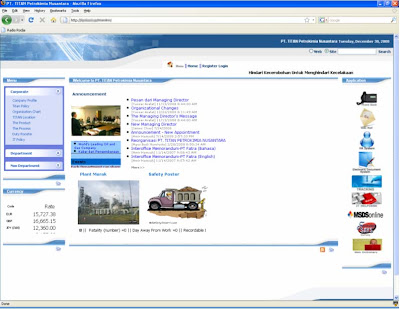


Intranet frontpage running well. Application link on the right pane need to be changed to the new server name. Phone book, web mail, Electronic Document System, Tracking, MSDS Online, IT Survey, web dictionary run well.

Additional configuration is needed for HR system and IT Helpdesk. Set the configuration at .php file at conf directory of each directory.


USER TEST ON INHOUSE APPLICATION AND INTRANET
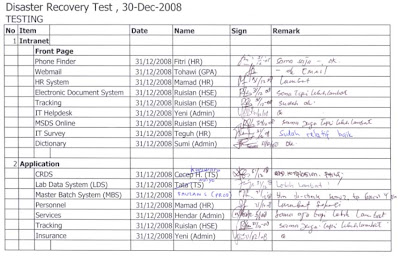


User test shown as picture above. Some user experience application on the backup server is slower than usually. This is because backup server hardware specification below the currently running server.

Email notification failed on CRDS. Need to configure xp_sendmail function at the database server.


PLACE FOR DATABASE AND DESKTOP APPLICATION BACKUP

All backup file stored on server called BACKUPSERVER.
1. C:\[DatabaseBackupPath] (database backup file on zip form, yaitu CRDB, EMPLOYEE, ESOFNET, INTRANET, LDSDB,MBS, TITANDNN, SERVICES, TRACKING)
2. C:\[InhouseProgramBackup] (backup currently running desktop application and source program on zip form)
3. C:\[SistemBackupPath] (php engine used, php.ini and phpinfo configuration)


BATCH FILE FOR BACKUP

Backup batch process running on server SOURCESERVER (currently running as database server, and desktop application server).
1. Database backup run daily on 01:00 am as MSSQL job.
2. Batch file run on 01:15 am, compress .bak file created on step 1, and then copy it to local SOURCESERVER and BACKUPSERVER.